
The editor opens as soon as you stop recording, or when you open a recording from the home window.
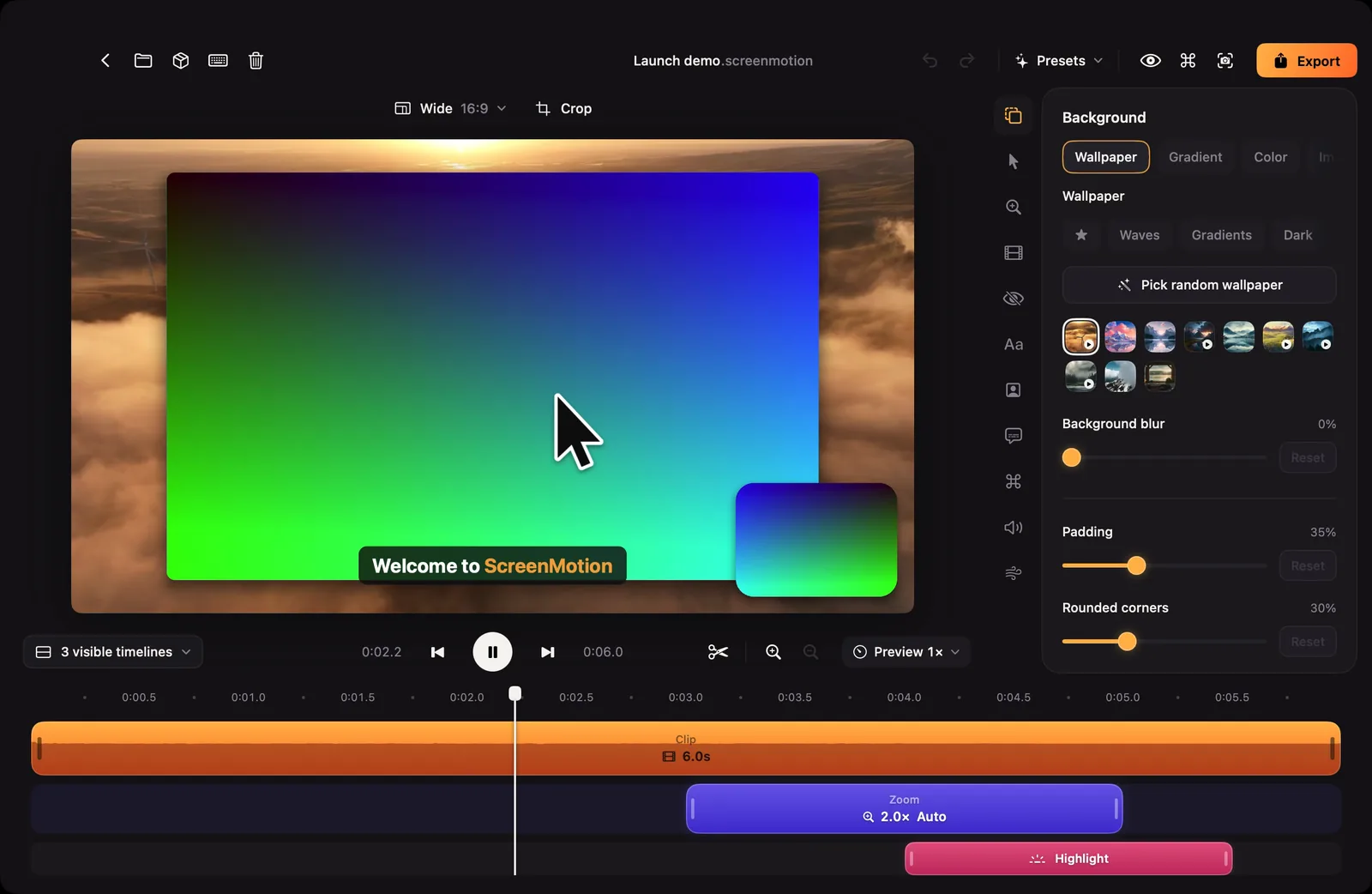
Along the top

- Back, Show in Finder, Share the project, Keyboard shortcuts and Move to Trash on the left.
- The project's name in the middle. Click it to rename.
- Undo and Redo, Presets, then three buttons: hide the settings panel for a larger preview, the command menu, and copy this frame as an image.
- Export on the right.
Above the preview
The aspect ratio menu (Wide 16:9 by default) and Crop. See Aspect ratio and Cropping.
The settings panel
On the right, a column of icons opens one group of settings at a time: Background, Cursor, Zoom, Clip, Masks, Text, Camera, Captions, Shortcuts, Audio and Animations. Selecting something on the timeline opens its settings by itself.
The transport and the timeline
Under the preview: play controls, the timeline's lanes, and tools to split, zoom the timeline and change the preview speed. See The timeline.