
Screen Motion records your pointer's path separately and draws a clean cursor on top, so you can restyle it after recording. Open the Cursor settings.
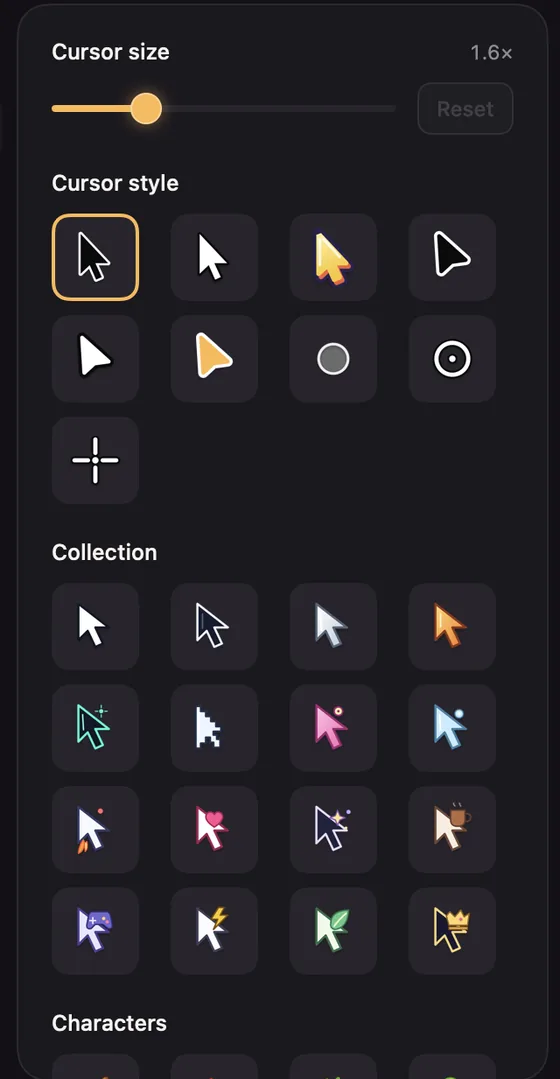
Size and style
- Cursor size: from 0.8× to 4×. The default is 1.6×.
- Cursor style: arrows, a light arrow, rounded arrows, an amber arrow, a Sticker arrow with six colours, a Dot, a Ring and a Crosshair.
- Collection: sixteen designed pointers, from Classic Pro and Midnight to Pixel Hero, Magic Wand and Royal Click.
- Characters: sixteen playful pointers, such as a banana, a rocket or a duck. They're centred on what you point at.
Hover over a style to see its name.
Behaviour
- Always use pointer cursor: keep the arrow even over text and links. Otherwise, arrow styles switch to a text beam or hand where your real cursor did.
- Hide cursor if not moving: fades it out after 1.5 seconds of stillness.
- Loop cursor position: near the end, the cursor glides back to where it started, so a looping video doesn't jump.
- Hide cursor: leave it out altogether.
How smoothly the cursor moves is under Animations. See Animations.